Fast ⚡ | Flexible 🔁 | Scalable 📈 | Secure 🔐 | Available 24/7 🕒 Email
Chain of Custody (CoC) Evidence
Remotely Android & iPhone (iOS) – Secure Digital Evidence Sharing Guide
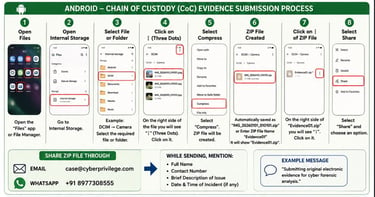
Chain of Custody (CoC) Evidence Submission Process
The following process helps preserve the integrity of digital evidence while submitting files, images, videos, documents, chats, screenshots, audio recordings, emails, or other electronic records for cyber forensic analysis and legal examination.
This guide is written in a simple step-by-step method so that even a non-technical person or layman can easily understand and securely submit electronic evidence remotely.
Important Instructions Before Sharing Evidence
Do NOT edit the original files
Do NOT crop screenshots
Do NOT rename original files before compression
Do NOT delete original evidence from the device
Always try to share original files
Compress the files into ZIP format before sharing
ZIP format helps preserve:
Original file structure
Metadata
Date & time information
Digital integrity of evidence
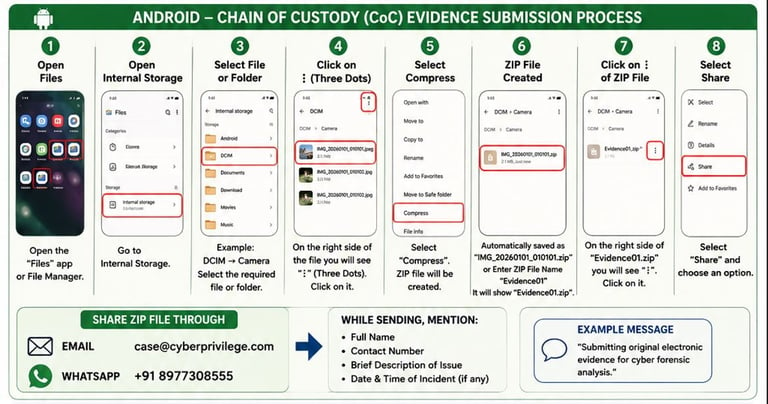
Android – Chain of Custody (CoC) Evidence Submission Process Step-by-Step Process
Step 1:
Open → Files
OR
Open → File Manager
Step 2:
Open → Internal Storage
Step 3:
Select the required file or folder
Example:
Open → DCIM
→ Camera
Now you can see files like:
IMG_20260101_010101.jpeg
Videos
Screenshots
Documents
Audio files
Step 4:
On the right side of the file you are able to see:
⋮ (Three Dots / More Options)
Click on:
⋮
Step 5:
Select:
Compress
Now the mobile automatically creates ZIP file.
Example:
Original File:
IMG_20260101_010101.jpeg
Compressed ZIP File:
IMG_20260101_010101.zip
OR
Enter ZIP File Name:
Evidence01
After compressing it shows:
Evidence01.zip
Step 6:
Now on the right side of:
Evidence01.zip
You are able to see:
⋮ (Three Dots)
Click:
⋮
Select:
Share
Step 7:
Now choose any one option:
Option 1 – Email
Send to:
Option 2 – WhatsApp
Send to:
+91 8977308555
Step 8:
While sending evidence mention:
Full Name
Contact Number
Brief Problem Description
Date & Time of Incident
Example:
“Submitting original electronic evidence for cyber forensic analysis.”
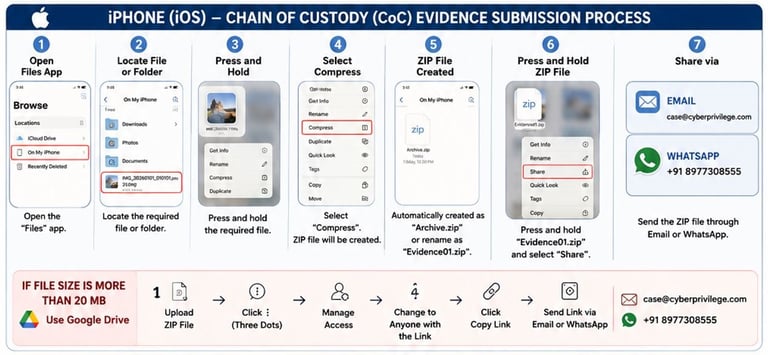
iPhone (iOS) – Chain of Custody (CoC) Evidence Submission Process
Step-by-Step Process
Step 1:
Open:
Files App
Step 2:
Locate the required file or folder
Example:
Photos
Videos
Documents
Screenshots
WhatsApp Export Files
Audio Recordings
Step 3:
Press and Hold the required file
Example:
IMG_20260101_010101.jpeg
Step 4:
Select:
Compress
The iPhone automatically creates:
OR
Rename ZIP File as:
Step 5:
Press and Hold:
Select:
Share
Step 6:
Choose any one option:
Option 1 – Email
Send to:
Option 2 – WhatsApp
Send to:
+91 8977308555
Step 7:
Mention:
Full Name
Contact Number
Brief Incident Information
Example:
“Submitting electronic evidence for forensic verification.”
If File Size is More Than 20 MB
If the ZIP file size is more than 20 MB:
Use Google Drive
Step 1:
Open:
Google Drive
Step 2:
Click:
+ New
Step 3:
Select:
File Upload
Upload:
Step 4:
After Upload Complete:
Click:
⋮ (Three Dots)
Select:
Manage Access
Step 5:
Change Restriction to:
Anyone with the Link
Remove all restrictions.
Step 6:
Click:
Copy Link
Step 7:
Send the Google Drive URL to:
Email:
OR
WhatsApp:
+91 8977308555
Why This Process is Important?
This process helps maintain:
Chain of Custody (CoC)
Originality of Evidence
Metadata Integrity
Legal Reliability
Secure Remote Submission
Forensic Authenticity
This is important for:
Cybercrime complaints
Legal disputes
Financial fraud investigations
Social media evidence
WhatsApp evidence
Cyber forensic examination
Court and legal support
Types of Evidence You Can Share
You can securely share:
Screenshots
Images
Videos
Audio Recordings
PDFs
Emails
WhatsApp Chats
Telegram Chats
Instagram/Facebook Evidence
Call Recordings
Cryptocurrency Fraud Evidence
Financial Fraud Documents
Screen Recordings
Threat Messages
Social Media Evidence
Contact Information
Cyber Privilege
Digital Forensics & Electronic Evidence Support
+91 8977308555
Website
Legal & Forensic Disclaimer
Electronic evidence should always be preserved in original condition. Any editing, modification, forwarding, recompression, or deletion may affect the integrity and admissibility of digital evidence during forensic analysis and legal proceedings.
Electronic evidence handling may be subject to applicable laws including:
Information Technology Act 2000
Bharatiya Sakshya Adhiniyam (BSA) 2023
DPDP Act 2023
Applicable Cyber Forensic and Digital Evidence Handling Standards.
Electronic Evidence* Certificates
We provide Digital Forenscic with electronic evidence* certificates for admissibility*. Source Files are collected from Client as a Chain of Custody*(CoC)
CYBER PRIVILEGE
Secure CONFIDENTIAL trust
Email id: case@cyberprivilege.com
Mobile No: +91 8977308555 (IVR) 24/7/365
Legal Disclaimer: © Copyright Reserved Cyber Privilege 2017 to 2036 All rights reserved. Cyber Privilege is ISO 9001:2005, ISO/IEC 27001:2022, ISO/IEC 27037:2012, ISO/IEC 27041: 2015, ISO/IEC 27042:2015, ISO/IEC 17025:2017 certified CyberSecurity, Darknet Research, VAPT, SOC, Digital Forensics company with Electronic Evidence* Certificate 63(4)(C) Part - B Authenticating Electronic Records as per BSA 2023 Regulations & Compliance*. strict compliance clarification, legal disclaimer, and evidence handling protocol Cyber Privilege acts only as a technical service provider handling digital data supplied by the client. All responsibility for factual claims, allegations, and legal consequences remains solely with the submitting party (the client). The certificate cannot be used for personal publicity, public circulation, or reputational campaigning. ANTI-THREATENING & NON-INTIMIDATION CLAUSE : The certificate must not be used to threaten, intimidate, coerce, extort, or pressure any individual or organization.Any such use constitutes illegal misuse of forensic documentation and will trigger: immediate certificate revocation, legal escalations. Initial contractual penalty of ₹6,80,000/- to 250 Crores, Possible Civil /Criminal recovery proceedings Reporting to competent authorities where required by law. Cyber Privilege is an equal opportunity employer and is committed to diversity and inclusion in the workplace. We do not discriminate on the basis of race, religion, color, national origin, gender, sexual orientation, age, marital status, veteran status, or disability status. Cyber Privilege Appointed Data Protection Officer (DPO) on 15/02/2025 Data Protection Policy as per Digital Personal Data Protection Act, 2023 DPDP Act 2023, IT ACT, GDPR Policies, Applicable Cyber Laws Bharatiya Sakshya Adhiniyam (BSA), 2023, Information Technology Act, 2000, etc. Cyber Privilege Private Digital Forensics, Electronic Evidence* & Cyber Investigation Complaince Policy
Aligned with the core principles of Confidentiality, Integrity, and Availability (CIA Triad).
65B certificate provider How to get 65B certificate 65B Evidence Act certificate Section 63 BSA certificate format 65-b certificate for mobile recording 65B Evidence Act certificate download 65B certificate for bank statement Section 63 BSA certificate format pdf electronic evidence in the bharatiya sakshya bill, 2023 Admissibility of electronic evidence in India Electronic evidence in Evidence Act Admissibility of electronic evidence in Indian Evidence Act The Cyber Forensics and Digital Evidence Certification under Section 63(4)(c) of the Bharatiya Sakshya Adhiniyam (BSA), 2023, is a legal requirement for the admissibility of electronic records in Indian courts. This provision aligns with the former Section 65B of the Indian Evidence Act, 1872, but introduces enhanced procedures to ensure the authenticity and integrity of electronic evidence. Andhra Pradesh Lawyers Evidence Certificate Andhra Pradesh Advocate Evidence Certificate Telangana Lawyer Evidence Certificate Telangana Advocate Evidence Certificate Andhra Pradesh Lawyer Evidence Certificate Andhra Pradesh Advocate Evidence Certificate Court Evidence Digital Evidence High Court Evience
Email id: investigate@cyberprivilege.com
Email id: gvk2015@gmail.com (Gmail/Drive )